
Windows desktop app • v1.23.06
Pin Traffic Studio
Create Pinterest-style pins faster with 80 editable templates, export-ready PNG images, and a helper screen that prepares your title, description, board, topics and alt text for manual Pinterest upload.
Buy Now — $29 Try the Free DemoTest a limited browser demo before purchasing. The full version includes all templates, export tools, Pinterest upload workflow, and the Windows desktop app.
Watch the demo
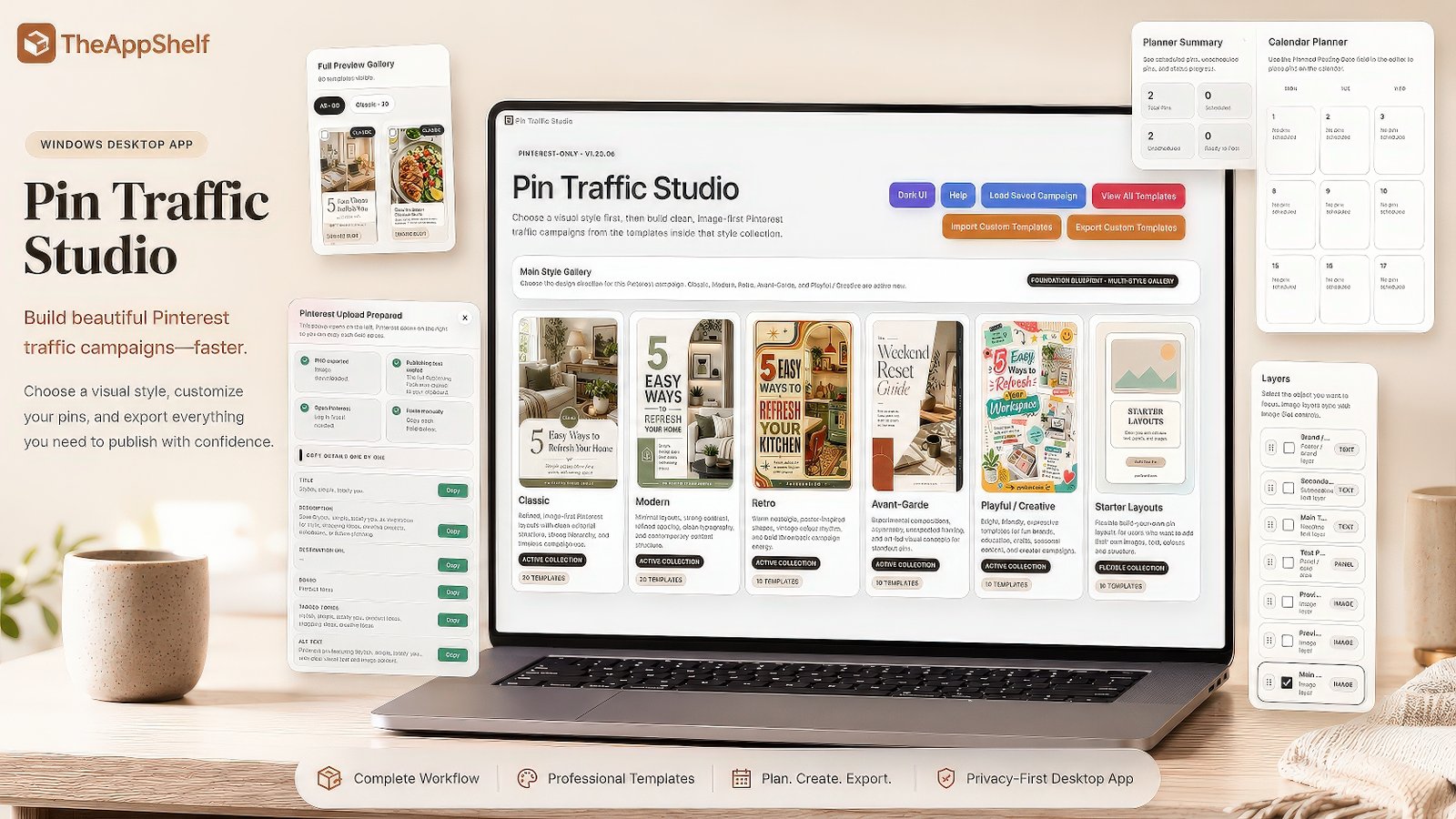
See Pin Traffic Studio in Action
Watch how Pin Traffic Studio helps you choose from 80 professionally designed editable pin templates, customise your design, export PNG images and prepare your Pinterest publishing text for manual upload.
Built for Pinterest content creation
What Pin Traffic Studio Helps You Do
Pin Traffic Studio brings Pinterest graphic creation, campaign organisation and publishing preparation into one focused Windows workflow, helping you create and manage promotional content without jumping between separate tools.
Create Pins Faster
Start from editable layouts instead of designing every Pinterest graphic from scratch. Change text, images, panels, colours and brand lines to fit your content.
Export Ready-to-Upload PNGs
Export clean PNG images that you can manually upload to Pinterest or use in your marketing, product promotions, blog posts and digital product campaigns.
Prepare Your Publishing Text
Keep your title, description, destination URL, board, topics and alt text together in one helper screen so your Pinterest upload is easier to complete.
Edit inside the app
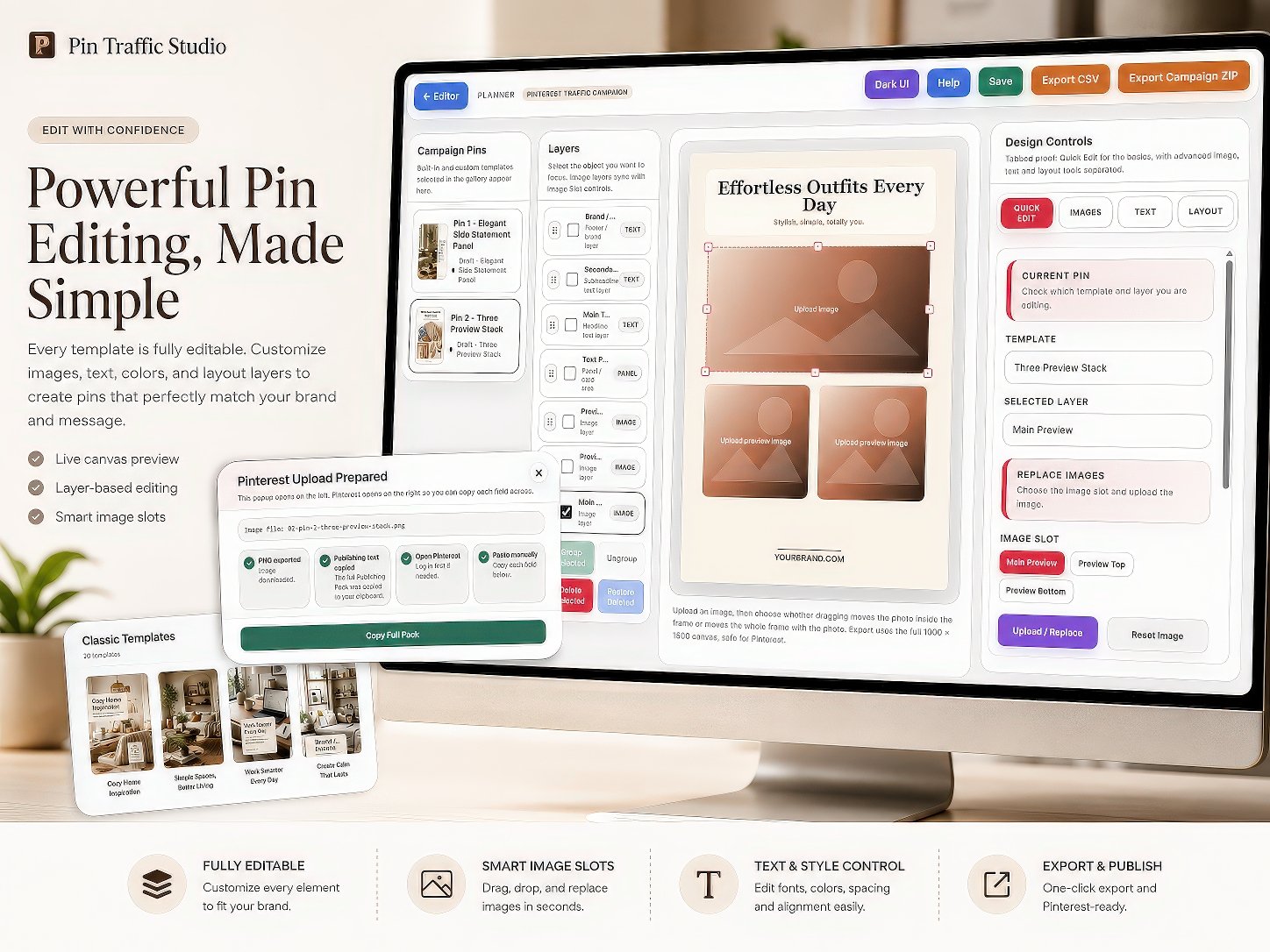
Design and customise your pins visually
Use the editor to adjust text, images, layers, panels, colours and brand elements before exporting your finished pin.
Everything you need in one app
Key Features at a Glance
Pin Traffic Studio is built to help you create, organise and prepare Pinterest-style promotional content faster, without needing separate design software.
80 Professionally Designed Editable Pin Templates
Start with ready-made Pinterest-style layouts and customise them for your products, posts, offers or content ideas.
Campaign Library & Planning Calendar
Save and organise your campaigns, then use the built-in planning calendar to keep upcoming Pinterest content structured and easier to manage.
Editable Text, Images & Layouts
Change titles, descriptions, images, panels, colours, brand lines and other design elements directly inside the app.
Blank Canvas Starter Layouts
Create custom pin designs from simpler starter layouts when you do not want to begin from a finished template.
Pinterest Upload Helper
Prepare your pin title, description, destination URL, board, topics and alt text in one organised helper screen.
One-Click Copy Fields
Copy prepared Pinterest text fields quickly so you can paste them into Pinterest while completing your manual upload.
PNG Export
Export your finished designs as PNG images ready to upload manually to Pinterest or use in your marketing.
Light & Dark Interface
Choose the interface style that feels most comfortable while creating and editing your pins.
Customer Guides Included
Includes clear customer guides for installation, quick start, Pinterest upload, system requirements and product information.
Want to try it first?
Open the limited browser demo and test the editing workflow before purchasing.
Try the Free DemoTemplate variety
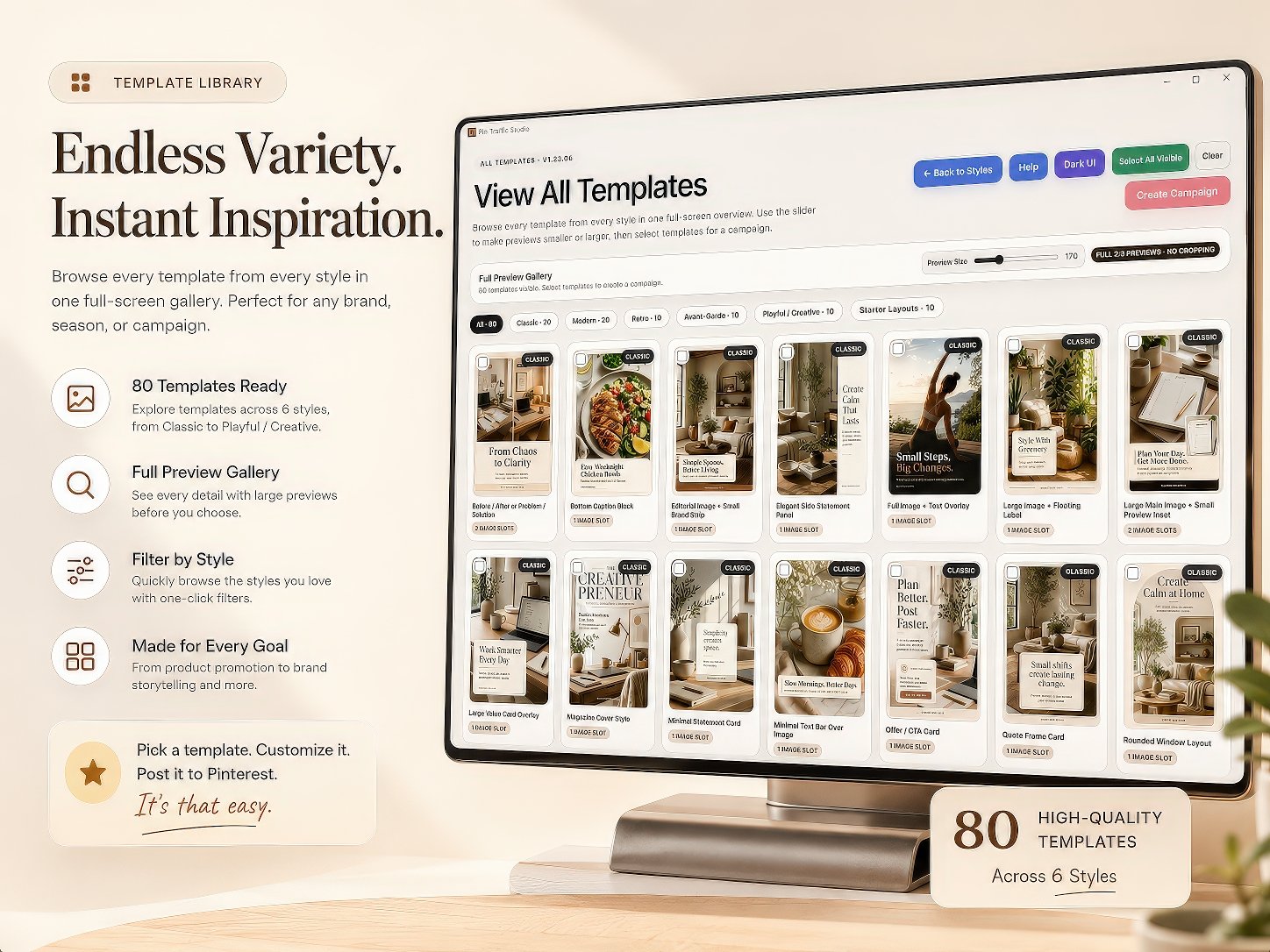
Start from a full library of editable pin designs
Browse 80 professionally designed Pinterest-style layouts, choose the design direction you want, then customise the template for your own content.
Ready to create your next campaign?
Create Your Pinterest Content in One Focused Workflow
Get Pin Traffic Studio with 80 professionally designed editable templates, campaign organisation tools and Pinterest publishing preparation in one practical Windows app.
More Than Just Designing the Graphic
Move From Pin Design to Publishing Preparation
Pin Traffic Studio helps you move from choosing a template and creating your Pinterest graphic to preparing the information you need for your publishing workflow — including the title, description, destination URL, board, topics and alt text.
Start with an editable template and customise your images, text, colours and branding.
Save your campaign and keep your Pinterest content structured with the built-in campaign and planning tools.
Prepare your Pinterest title, description, URL, board, topics and alt text for manual publishing.
Manual Pinterest upload helper
How Manual Pinterest Upload Works
Pin Traffic Studio does not automatically publish pins for you. Instead, it helps you prepare the image and publishing text so you can upload everything manually inside Pinterest.
Create Your Pin
Choose a template or starter layout, then edit the text, image, panels, colours and brand line.
Export Your PNG
Export the finished pin image as a PNG file, ready to upload manually to Pinterest.
Prepare Your Text
Use the Pinterest helper popup to prepare your title, description, URL, board, topics and alt text.
Upload Manually
Open Pinterest, upload the PNG, then copy each prepared field into the Pinterest Create Pin page.
Manual upload helper
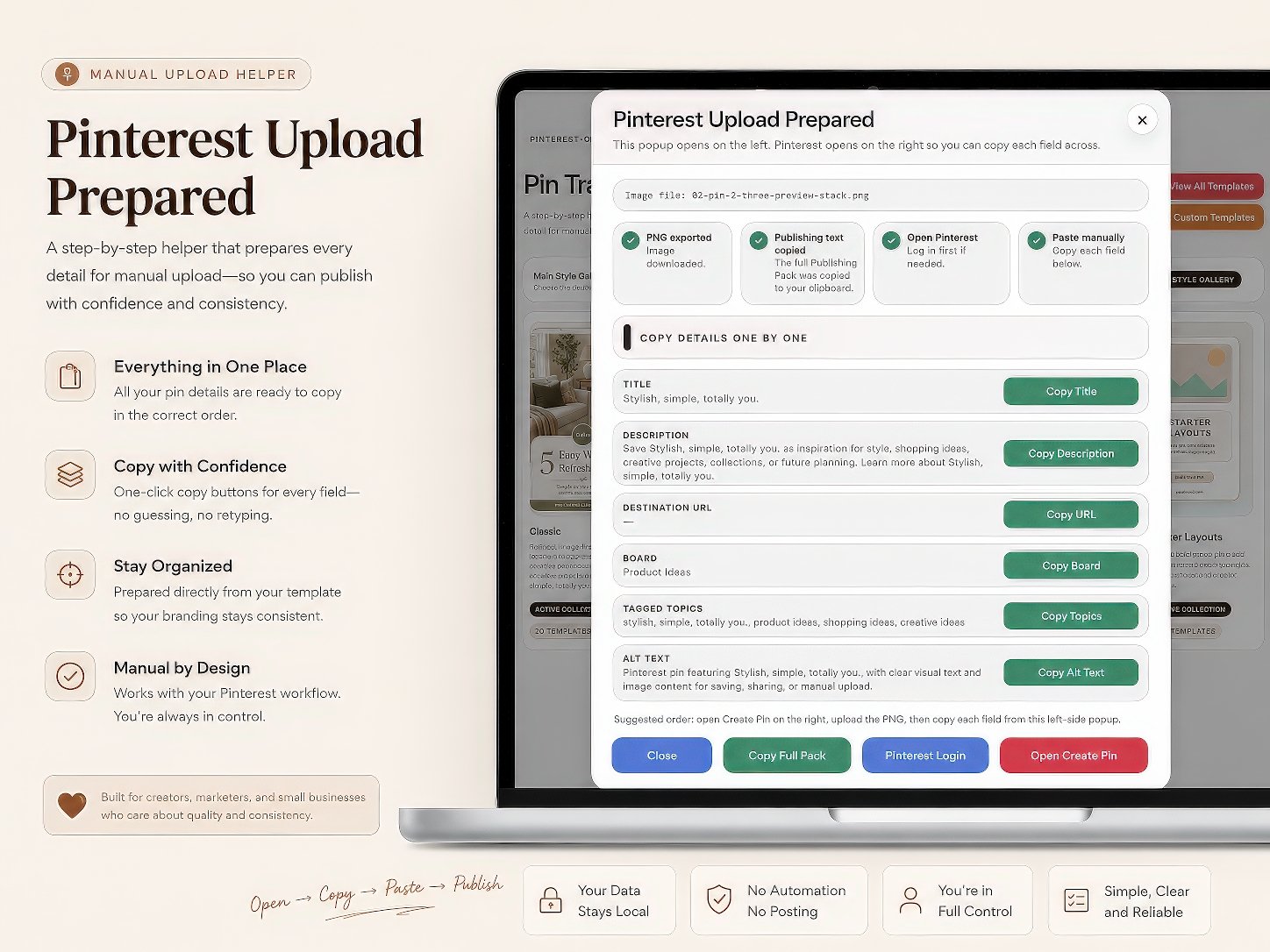
Prepare the text fields before opening Pinterest
The helper screen keeps your title, description, destination URL, board, topics and alt text organised so you can copy each field during manual upload.
Before you buy
System Requirements
Pin Traffic Studio is a downloadable Windows desktop app. Please check these requirements before purchasing.
Supported System
- Windows 10 or Windows 11
- 64-bit Windows computer
- Desktop or laptop computer
What You Need
- Internet access to download the ZIP file
- A browser for opening Pinterest manually
- Enough space to extract and run the app
Not Required
- No Canva account required
- No design software required
- No subscription required for the app itself
What’s Included
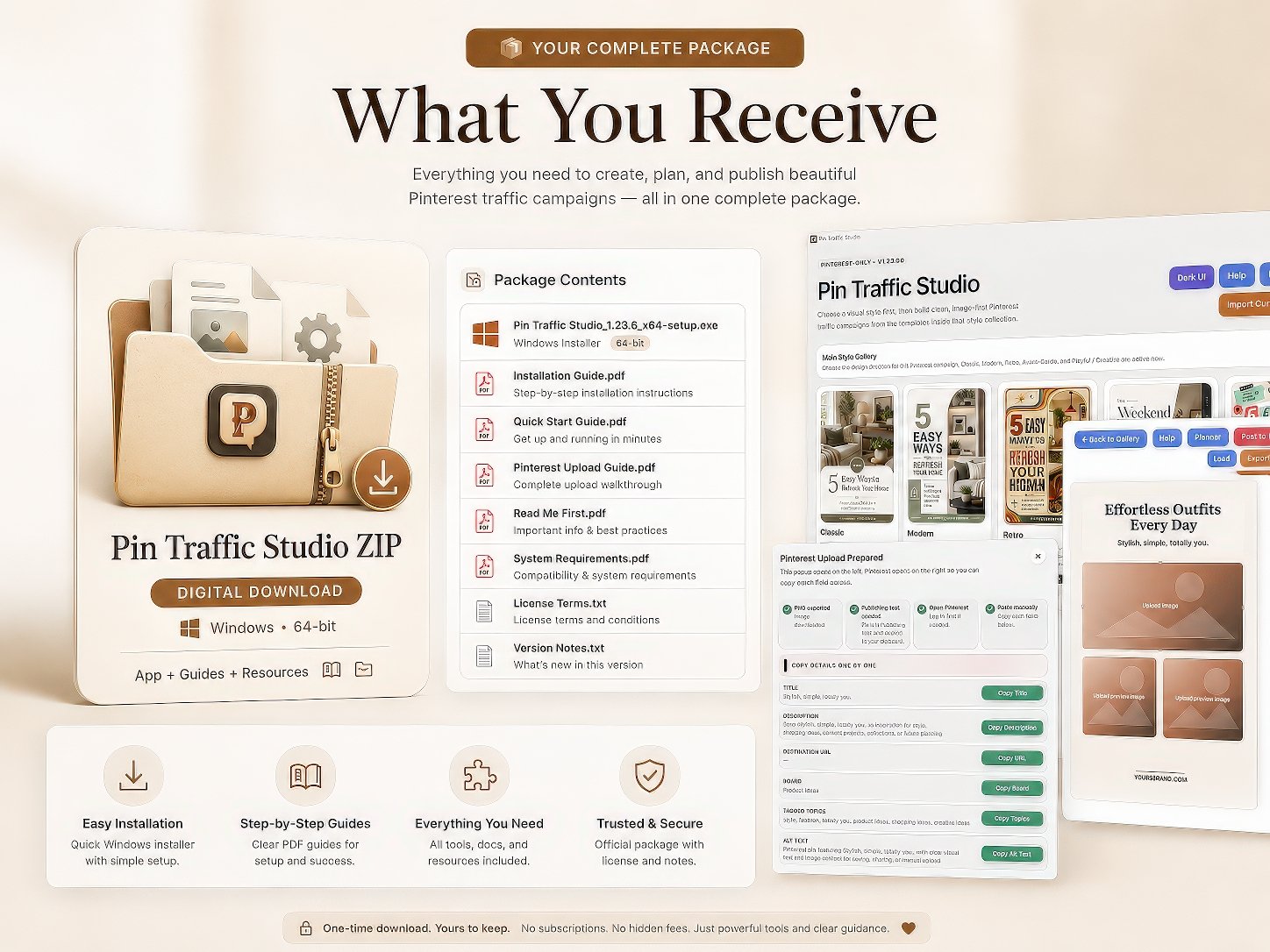
Your purchase includes the Pin Traffic Studio Windows app plus the essential guides and support files you need to install it, start using it quickly, and understand the manual Pinterest upload workflow.
Main App Download
- Pin Traffic Studio Windows installer
- 80 professionally designed editable pin templates
- 64-bit desktop app
- One-time downloadable ZIP package
- Ready for Windows 10 and Windows 11
Included Guides
- Installation Guide PDF
- Quick Start Guide PDF
- Pinterest Upload Guide PDF
- Read Me First PDF
- System Requirements PDF
Extra Included Files
- License Terms file
- Version Notes file
- Helpful setup information
- Usage guidance for the app
Important: This is a digital product. You will receive a downloadable ZIP package containing the Windows app and the included documents. No physical item is shipped.
What you receive
Your download includes the app and customer guides
After purchase, you receive a customer ZIP file with the Windows installer and helpful PDF guides for installation, quick start and Pinterest upload.
Everything You Need to Get Started
Start Creating Your Pinterest Campaigns With Pin Traffic Studio
Get the complete Pin Traffic Studio Windows app with 80 professionally designed editable templates, campaign organisation, planning tools and Pinterest publishing preparation.
One-time purchase • No recurring app subscription • Instant digital download
Questions before buying
Frequently Asked Questions
Here are the most important things to know before purchasing Pin Traffic Studio.
Is Pin Traffic Studio a Windows app?
Yes. Pin Traffic Studio is a downloadable Windows desktop app for Windows 10 and Windows 11. It is not currently a Mac, iPad, Chromebook, iPhone or Android app.
Do I need Canva or design software?
No. Pin Traffic Studio includes editable layouts inside the app, so you do not need Canva, Photoshop or other design software to use it.
Does the app publish pins automatically?
No. The app helps you create your pin image and prepare your title, description, URL, board, topics and alt text. You then upload everything manually inside Pinterest.
What happens after purchase?
After checkout, you receive access to the customer ZIP file containing the Windows installer and the included PDF guides. You should download the ZIP, extract it, then run the installer.
Why does Windows show a security warning?
Some Windows computers may show a standard SmartScreen message the first time you open a new app from an independent developer. If this happens, the included Installation Guide explains how to continue by clicking More info, then Run anyway. Only install the app from your official TheAppShelf purchase download.
Can I use exported images for my business?
Yes, you can use the images you create and export for your own business, products, marketing, Pinterest content, blog posts or promotional graphics, subject to the included license terms.
Does Pin Traffic Studio include a money-back guarantee?
Yes. Pin Traffic Studio includes a 14-Day Money-Back Guarantee. If you purchase the software and decide it is not right for you, you may request a refund within 14 days of purchase, subject to the published refund policy and any rights you may have under applicable consumer protection laws.
Does this guarantee Pinterest traffic or sales?
No. Pin Traffic Studio helps you create and prepare Pinterest-style content, but it does not guarantee Pinterest views, clicks, rankings, traffic or sales.
Ready to create pins faster?
Start Using Pin Traffic Studio Today
Get the Windows installer, customer guides, and Pinterest upload workflow in one instant digital download.
Buy Now — $29Not ready yet? Try the free demo first.
Disclaimer: Please note that this product does not provide any guarantee of income or success. The results achieved by the product owner or any other individuals mentioned are not indicative of future success or earnings. This website is not affiliated with FaceBook or any of its associated entities. Once you navigate away from FaceBook, the responsibility for the content and its usage lies solely with the user. All content on this website, including but not limited to text, images, and multimedia, is protected by copyright law and the Digital Millennium Copyright Act. Unauthorized copying, duplication, modification, or theft, whether intentional or unintentional, is strictly prohibited. Violators will be prosecuted to the fullest extent of the law.
We want to clarify that JVZoo serves as the retailer for the products featured on this site. JVZoo® is a registered trademark of BBC Systems Inc., a Florida corporation located at 1809 E. Broadway Street, Suite 125, Oviedo, FL 32765, USA, and is used with permission. The role of JVZoo as a retailer does not constitute an endorsement, approval, or review of these products or any claims, statements, or opinions used in their promotion.
